
New ortho referral
Order present • Imaging missing
Workflow Use Case
Manage referral intake, completeness, communication, status updates, and scheduling from one centralized referral queue.
Last updated:
Operational picture
Referral work moves from intake to completeness review, scheduling, status follow-up, and provider updates in one queue.
Signals
Order present • Imaging missing
Specialist selected
Insurance checked • Patient contacted
How it works
Here is the whole path a case takes, from the moment it shows up to the moment it is done.
01 / Inbox
Referrals arrive by fax, portal, email, or upload and all land in one shared referral list.
The referral shows up right away instead of sitting in one inbox.
02 / Checklist
Calvient checks for the order, the diagnosis, demographics, insurance, and whatever the specialty requires.
You know a referral is incomplete before you try to schedule it.
03 / Tasks
Calvient messages the referring office or the patient for what is missing and moves the ready referrals toward scheduling.
The next step is always clear, and someone owns it.
04 / Status
The status stays current from new to scheduled to seen, including the note that comes back from the specialist.
Patients and referring offices stop disappearing into a black hole.
What operators see
These are the working surfaces that keep the queue understandable, actionable, and measurable.
Inbox
Coordinators see referral type, patient context, missing artifacts, and the next route before they touch the case.
Cardiology referral
Needs echo report before scheduling
GI outbound referral
Packet ready to send
Neurology consult
Waiting on patient response
Tasks
The queue shows who owns the case, what is waiting, and which communication needs to happen next.
Request imaging records
Fax + call cadence active
Schedule new consult
Patient text sent
Consult note chase
Outside office overdue
Reporting
Leaders can see where referrals stall, which sources send incomplete packets, and where conversion drops.
Inbound referrals
Fastest turnaround this week
Outbound coordination
Most missing records follow-up
Consult note returns
Biggest leakage risk
Workflow Views In Product
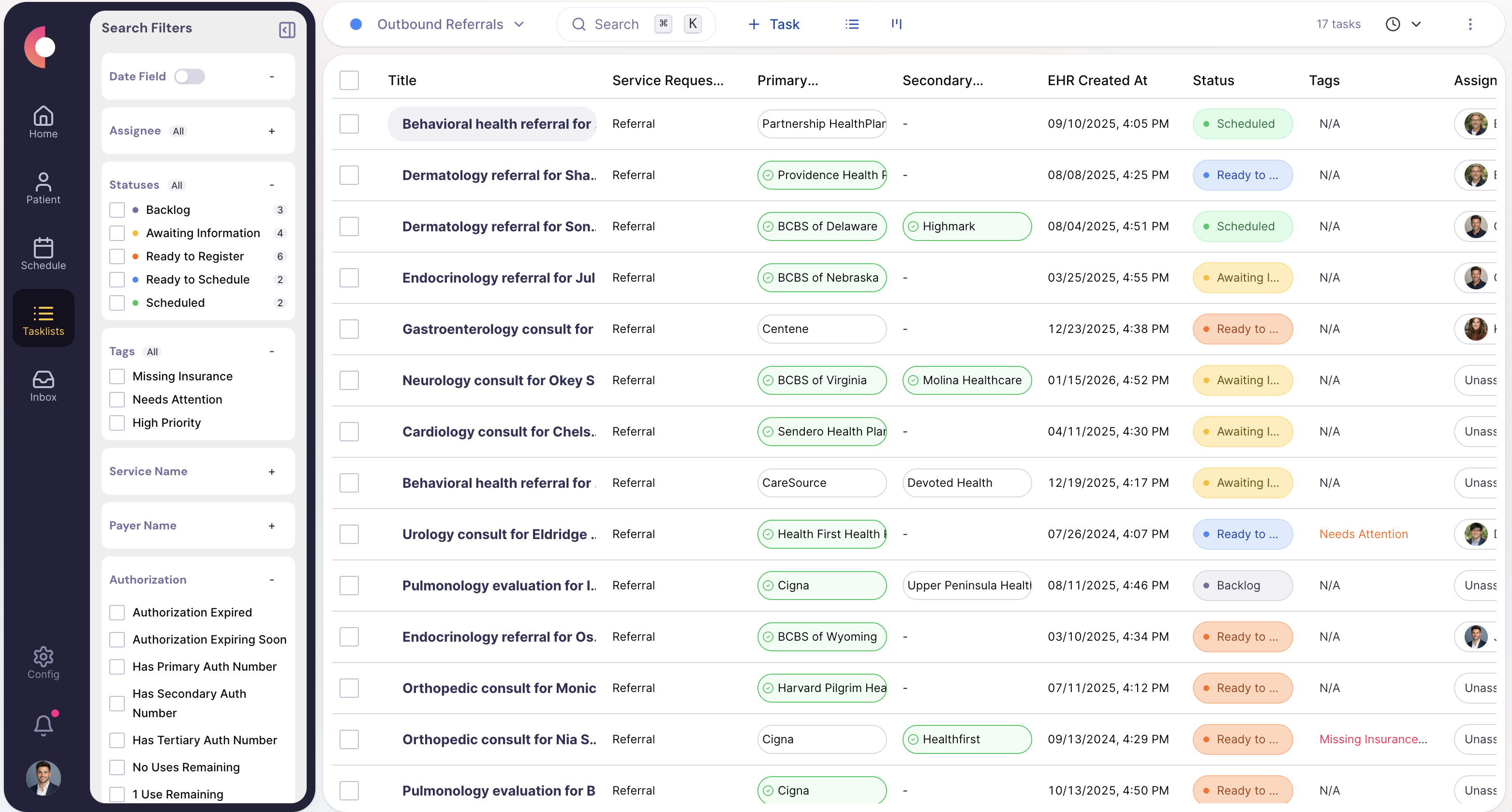
Queue view with completeness tags, owner, and next status.
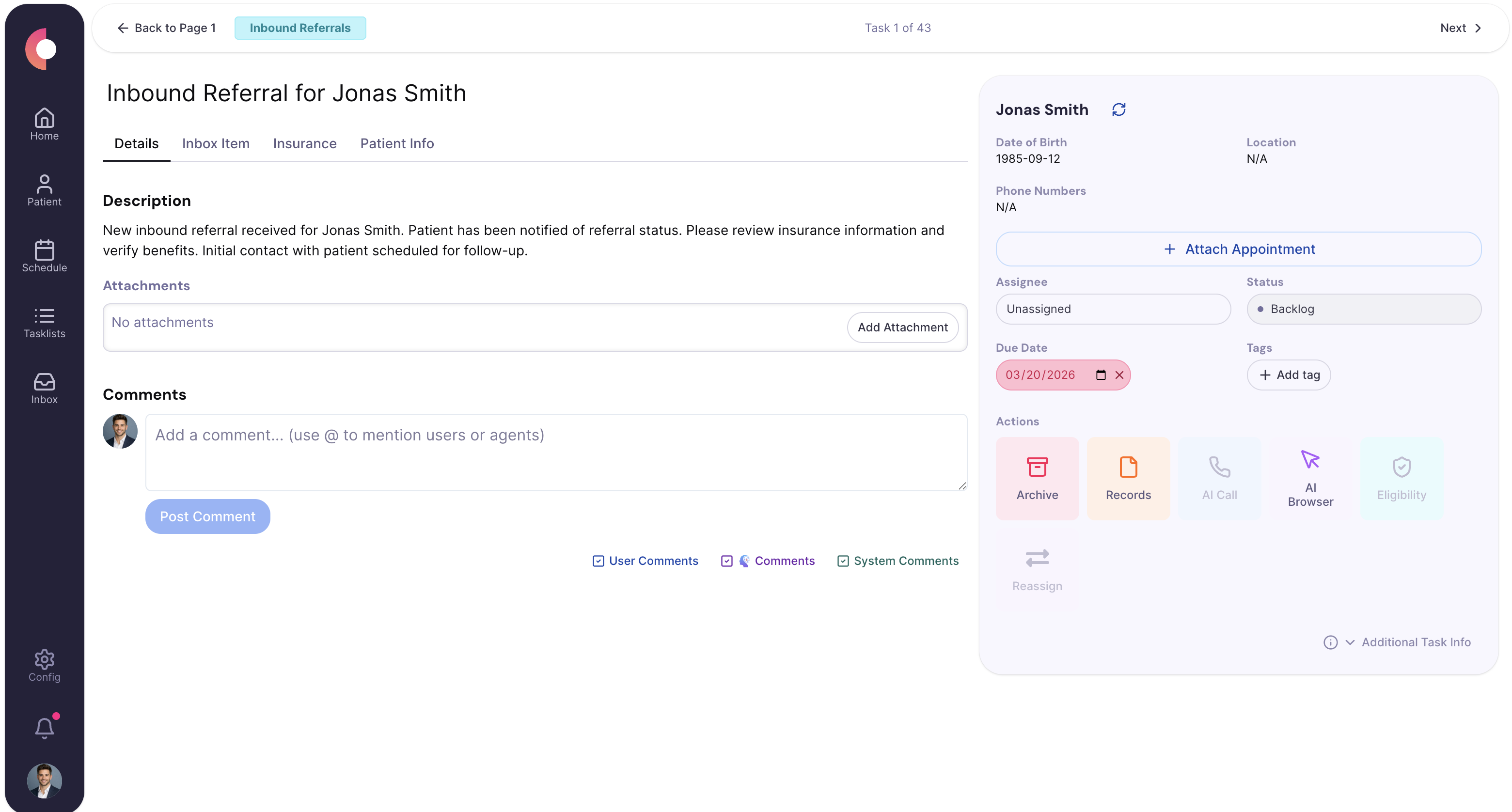
Case history showing provider outreach, patient outreach, and closure state.
Referral ROI Calculator
Choose inbound or outbound, set your volumes, and see the staff hours and labor cost Calvient could reclaim.
Sets the default monthly volumes for each workflow.
Most practices focus on one — pick inbound or outbound to see its estimate.
Receiving and working inbound referrals with less manual handling.
Select a workflow above to build your estimate.
Special Agents
These agents are useful because they handle the repetitive middle of the workflow while leaving sensitive or ambiguous decisions with staff.
Compares each packet against your referral requirements before the case gets scheduled or advanced.
Trigger
New inbound or outbound referral packet
Actions
Handoff
Returns the case to coordinators only when exceptions need human judgment.
Runs recurring status checks so coordinators are not manually rechecking the same cases all day.
Trigger
Cases that are waiting on scheduling, consult notes, or outside-provider action
Actions
Handoff
Escalates only when the referral is aging out or blocked.
Keeps referring offices informed at key milestones without manual status emails or calls for every case.
Trigger
Milestone changes such as scheduled, incomplete, or completed
Actions
Handoff
Routes high-friction provider communication to the coordinator managing the case.
Operational channels
Referral management spans inbound packets, outbound coordination, patient follow-up, and outside-provider communication.
Fax
Inbound referral packets, outside records, and consult-note returns
Text
Patient outreach for scheduling and missing intake steps
Phone
Provider offices, patient callbacks, and unresolved referral status checks
Browser
Portal status review or specialist coordination where no API exists
Forms
Referral request forms, uploads, and patient-submitted documents
EHR / integrations
Chart context, scheduling handoff, and referral filing
Teams that use this
Most organizations split referral work across intake, access, and follow-up. This page is designed to keep all three looking at the same operating state.
KPIs / outcomes
The right operating system should make these measures easier to see, easier to improve, and easier to explain to leadership.
KPI
How long referrals take from receipt to meaningful progress or closure.
KPI
How quickly a new referral gets worked after it arrives.
KPI
How many workable referrals reach the scheduled state.
KPI
How many referrals stall, disappear, or fail to close the loop.
Related use cases
Capture inbound work from fax, email, forms, and other channels, classify it, and route it to the right team and queue.
Handle benefits checks, prior auth submissions, payer portal submissions, status follow-up, and renewals.
Prepare patients before visits with reminders, paperwork, insurance updates, and appointment coordination.
Referral intake automation captures every inbound referral — fax, portal, or direct message — into a tracked queue, validates completeness against required clinical and demographic fields, triggers outreach for anything missing, and routes each referral by specialty, urgency, or payer. At high volume the practical difference is that staff stop touching clean referrals entirely and only see the exceptions.
Calvient checks eligibility, plan type, and whether the referring and receiving providers are in-network. It flags coverage gaps or plan mismatches before the patient is scheduled so the team has time to resolve issues rather than discovering them at the visit.
Calvient identifies what is missing, logs the gap, and routes the referral to the appropriate queue with a clear status. It can also trigger outreach to the referring office to collect what is needed without requiring staff to manually track each open item.
Yes. Routing rules can be defined by specialty, referral source, payer, urgency designation, or a combination of factors. Queue assignments update automatically as referral details are filled in.
Calvient monitors for the incoming consult note and flags referrals where the note has not arrived within the expected window. Staff see outstanding notes in a dedicated queue rather than relying on memory or manual follow-up.
Yes. Calvient maintains a status record for each referral from initial intake through scheduling, records exchange, and consult note return. Leadership can see where referrals are stalling across the full workflow.
Bring one process. Leave with a launch plan.