
Cardiology referral packet
Patient matched • Urgent keyword found
Workflow Use Case
Centralize inbound operational work from fax, forms, documents, and communications into one queue, then classify, extract, and route it automatically.
Last updated:
Operational picture
Calvient captures incoming items, extracts key context, and turns loose documents into routed operational tasks.
Signals
Patient matched • Urgent keyword found
Authorization incomplete
Ordering provider identified
How it works
Here is the whole path a case takes, from the moment it shows up to the moment it is done.
01 / Inbox
Faxes, emails, uploads, and form responses all arrive in one queue, with the sender and the time already noted.
Nothing gets stuck in a fax machine or a shared inbox no one is watching.
02 / AI intake
Calvient reads each document and lines it up with the right patient and the right kind of work.
You open every item already knowing whose chart it belongs to.
03 / Details
Document type, insurance, ordering provider, due dates, and anything missing are pulled off the page for you.
You get something you can act on, not a scan you have to retype.
04 / Routing
Each item goes to the right team, gets flagged when it is urgent, waits when a piece is missing, or closes on its own when it is routine.
People see the work that is actually theirs, and less slips through.
What operators see
These are the working surfaces that keep the queue understandable, actionable, and measurable.
Inbox
Staff see source, likely patient, document type, and urgency before opening the item.
Referral packet
Patient matched • Missing insurance card
ROI request
Authorization still needed
Lab result
Send to nurse review queue
Tasks
Operators work a task list that already knows who should own the case and what must happen next.
Missing records chase
Due today • Fax + text follow-up
Insurance verification
Ready for payer check
Duplicate document review
Candidate for auto-close
Reporting
Leaders can see where automation is helping and where work still needs manual review.
Fax intake
High volume • Stable exception rate
Form intake
Fastest first-touch time
Email attachments
Needs sender cleanup
Workflow Views In Product
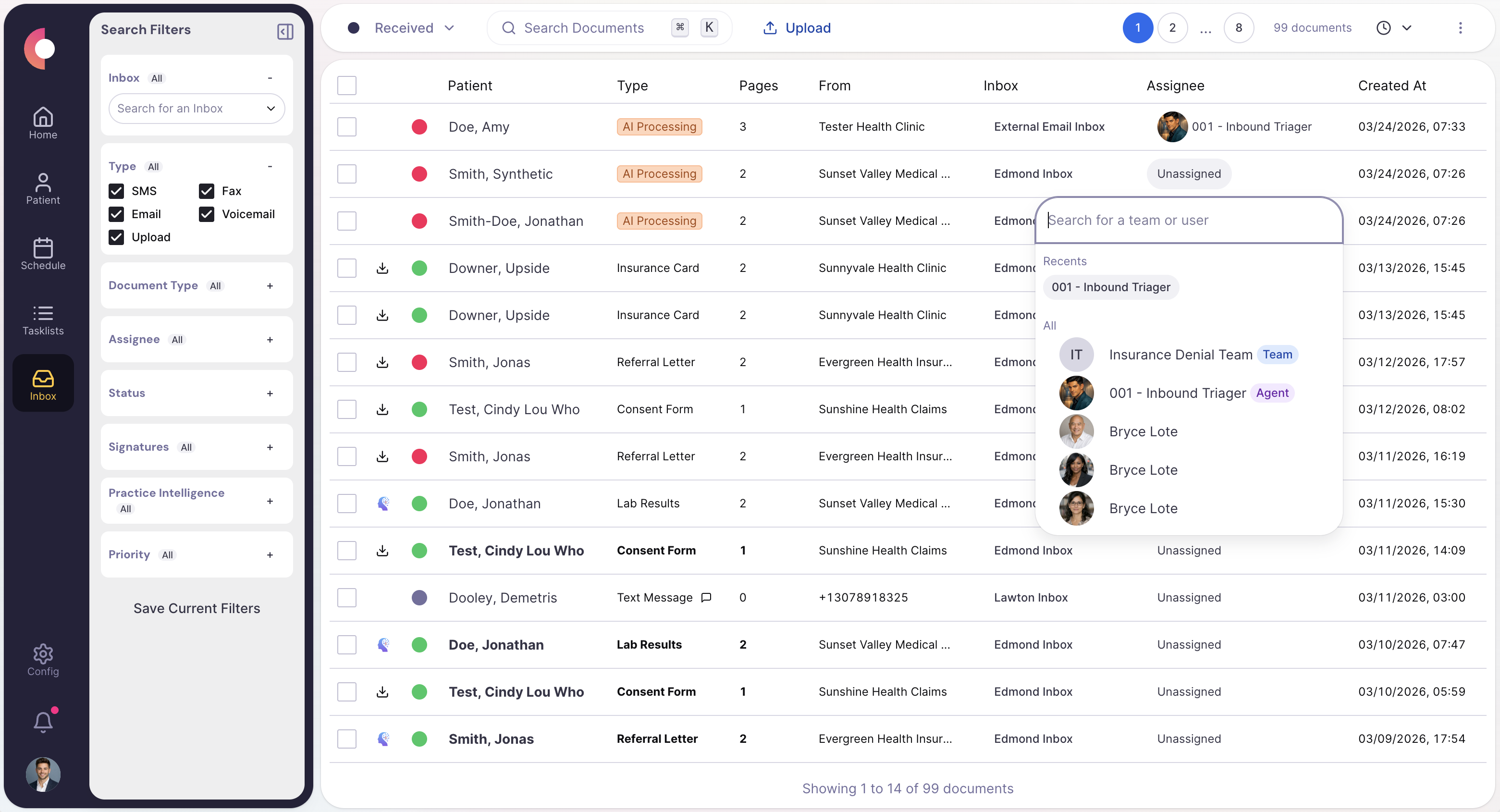
Queue view with extracted metadata, urgency tags, and route suggestions.
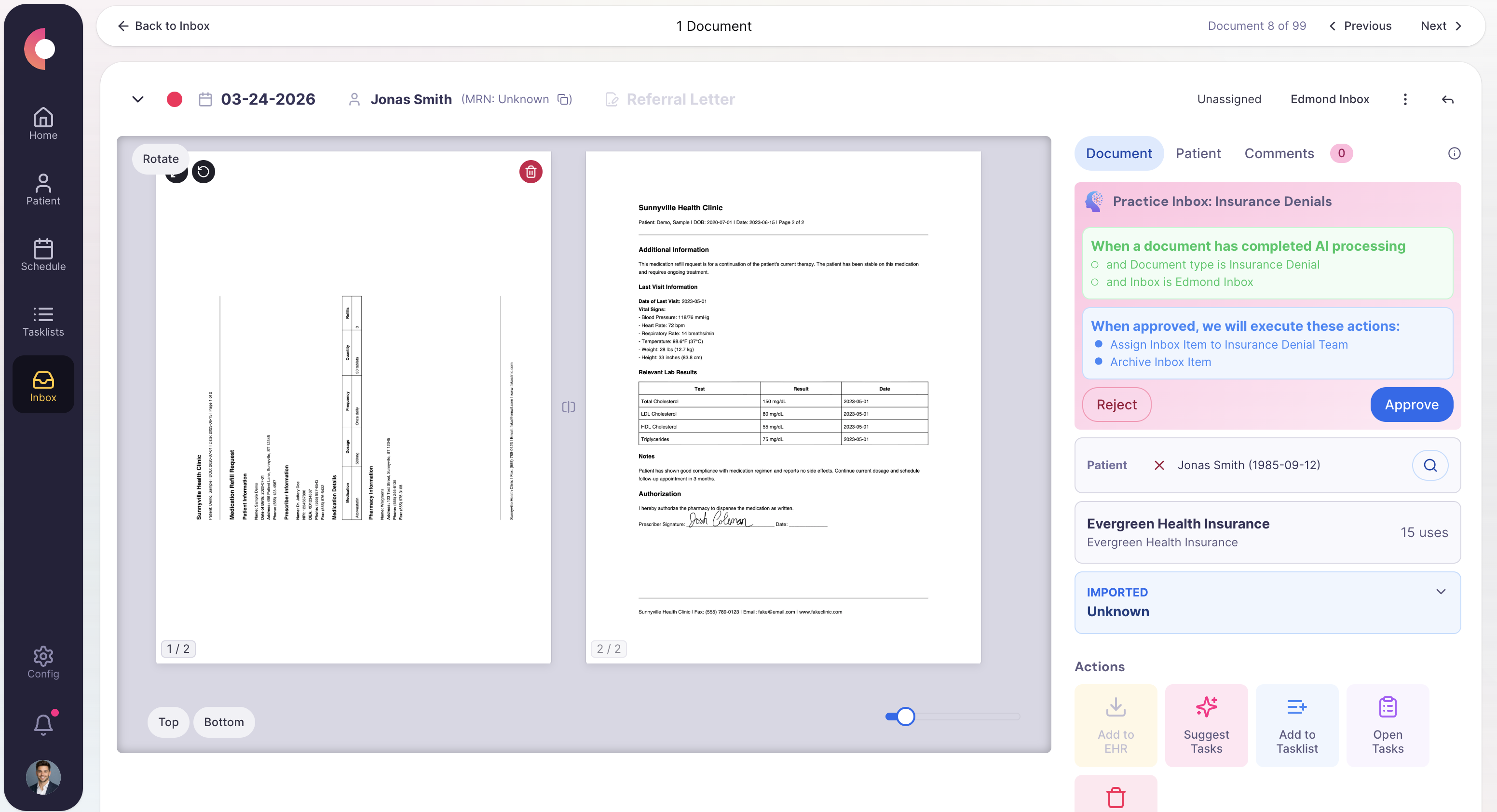
Task detail showing document context, owner, and agent actions.
Special Agents
These agents are useful because they handle the repetitive middle of the workflow while leaving sensitive or ambiguous decisions with staff.
Requests required artifacts and keeps the case moving until the packet is complete.
Trigger
Incomplete referral, ROI request, or intake packet
Actions
Handoff
Routes stale or high-risk cases to the assigned intake owner.
Surfaces time-sensitive items before they disappear into normal queue volume.
Trigger
Urgent keywords, high-risk source, or rules-based priority match
Actions
Handoff
Hands urgent work to the appropriate operational or clinical queue.
Handles repeatable routing decisions when confidence is high and policy is clear.
Trigger
Known document patterns and high-confidence classification
Actions
Handoff
Leaves a full audit trail for staff review and reporting.
Operational channels
This intake process starts in unstructured channels and ends in routed, owned tasks.
Fax
Referral packets, ROI requests, payer letters, and inbound clinical documents
Text
Follow-up for missing patient forms or clarification requests
Phone
Callback tasks or AI-call outcomes that need queue ownership
Browser
Portal review when an inbound item points to an external workflow
Forms
Digital intake forms, uploads, and internal request forms
EHR / integrations
Chart lookup, filing, and downstream workflow creation
Teams that use this
Usually owned by centralized intake or shared services, with exceptions routed to specialty teams once the item is understood.
KPIs / outcomes
The right operating system should make these measures easier to see, easier to improve, and easier to explain to leadership.
KPI
How quickly new inbound work is reviewed or auto-routed after arrival.
KPI
How much unworked intake is sitting in the queue by source and team.
KPI
How often Calvient can classify and route without human intervention.
KPI
How often inbound items still need manual interpretation or correction.
Related use cases
Centralize inbound and outbound referral work, track status, request missing information, and move patients forward.
Prepare patients before visits with reminders, paperwork, insurance updates, and appointment coordination.
Receive, validate, retrieve, and send medical records and release-related documents.
Calvient captures inbound work from fax, email attachments, uploaded documents, and digital form submissions. Common document types include referral packets, records requests, payer letters, lab results, and authorization documents. All arrivals land in one intake queue regardless of source.
Calvient uses AI to identify the likely document type, workflow category, urgency signals, and sender context before a staff member opens the item. This means the team sees what something is and where it belongs before they have to read through it manually.
Calvient flags the gap, logs what is missing, and routes the item to the appropriate queue with the deficiency already noted. It can also trigger outreach to the sending party to request what is needed, and the case reopens automatically when new documents arrive.
Yes. Routing logic can be configured by document type, sender, urgency level, payer, or keyword patterns. High-confidence items can be routed or even auto-closed without manual review, while exceptions are surfaced for staff attention.
Classification and routing happen automatically at intake, so items are visible and assigned before a staff member would otherwise have had time to open the fax or email. Exact processing time depends on document complexity and configuration, but the goal is to eliminate the queue of unread, unsorted items entirely.
Bring one process. Leave with a launch plan.